
Most home service businesses handle Instagram location tags one of two ways.
- They skip them entirely
- They tag their home city once when setting up the profile and never think about it again
Neither is wrong exactly. But both are leaving a real opportunity on the table, especially for a business that works across an entire service area instead of sitting in one storefront.
This guide covers both the actual steps and the strategy. Including the one workaround most guides bury or get wrong: creating a custom location that doesn’t exist yet in Instagram’s database.
Why Location Tags Matter More for Home Service Companies Than Most Businesses
A restaurant has one location to tag. A roofing or HVAC company works in dozens of neighborhoods a year.
That is not a disadvantage. It is actually a bigger location-tagging opportunity than any fixed-address business has, if it is used deliberately.
Here is the reframe most contractors miss:
- Every completed job is a real job site in a specific neighborhood
- Every tagged post plants a geographic flag in that neighborhood
- Over months, tagging jobs across ten or fifteen neighborhoods tells Instagram something a coffee shop or boutique can never say: this company is actively working across this entire area
The conventional Instagram advice assumes a fixed-address business. Tag your storefront, post from there, done. For a business without a storefront, this makes location tagging sound pointless. It is the opposite.
Homeowners increasingly use social media as a search engine, searching for contractors by location rather than by following specific accounts. A roofing company with tagged job posts across a metro area has a much better shot at appearing in those searches than one that tagged its home city once.
And beyond discovery, location-tagged content builds the kind of local social media presence homeowners use to evaluate trust before picking up the phone. A visible trail of real job-site content across recognizable neighborhoods reads as established and active in a way that generic branded posts never will.
How to Add a Location to a Post, Story, or Reel
Simple mechanic, slightly different depending on what you are posting. Here is how each one works as of August 2026.
Feed Post
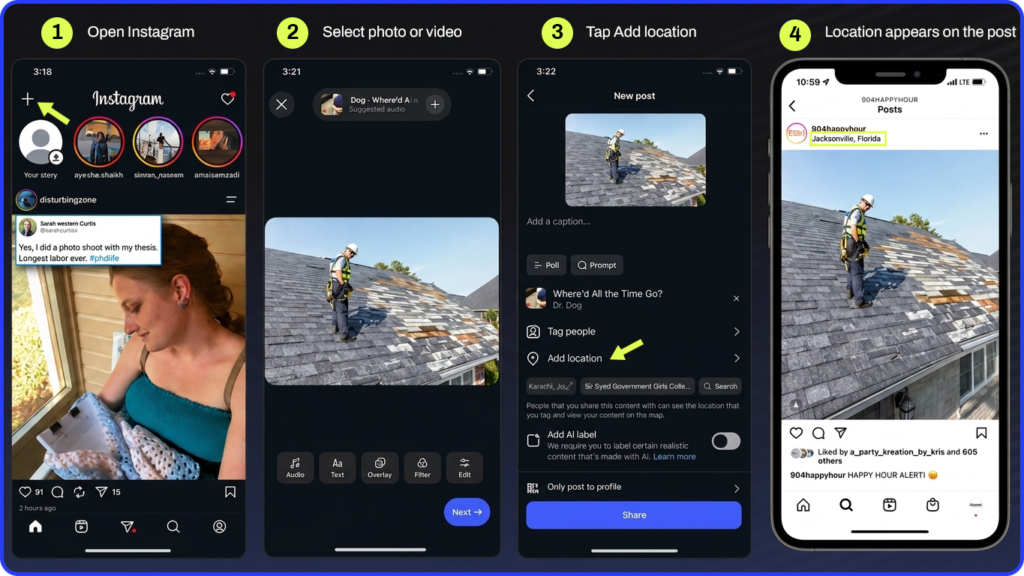
- Tap the + icon at the top left of the screen to create a new post
- Select your photo or video and apply any edits
- On the caption screen, tap “Add Location” below the caption field
- Either select from the GPS-suggested locations that appear automatically, or type a specific neighborhood, landmark, city, or business name in the search bar
- Tap the location you want. It appears below your username on the post
- Tap Share
To edit or add a location to a post you have already published: tap the three dots in the top right corner of the post, select Edit, then tap the location field just below your username. Search, select, and tap Done. The location is added without changing the post’s original timestamp.
Story
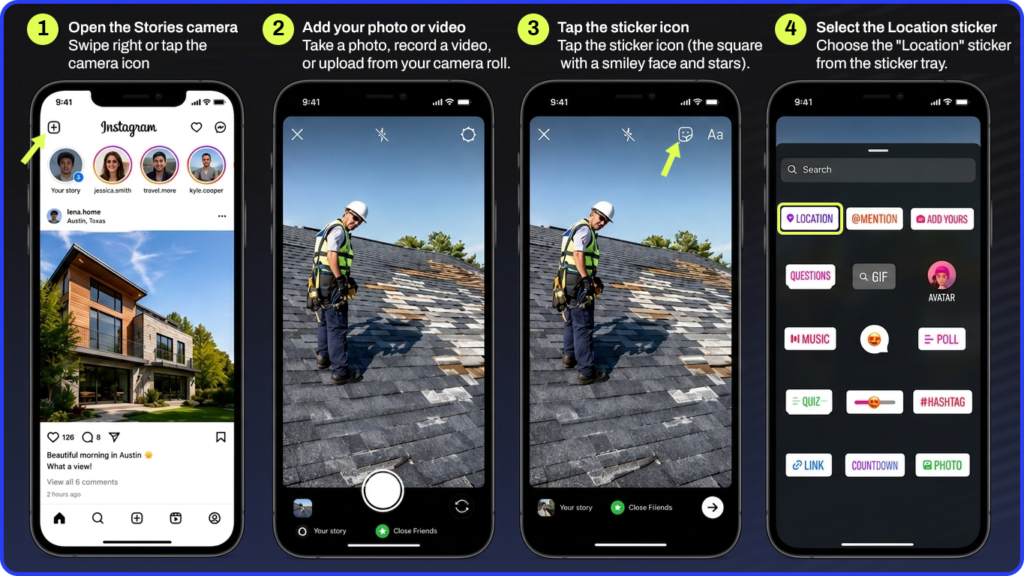
- Swipe right or tap the camera icon to open the Stories camera
- Take a photo or video, or upload one from your camera roll
- Tap the sticker icon (the square with a smiley face and stars) at the top of the screen
- Select the Location sticker from the sticker tray
- Type the location name in the search bar that appears
- Select the correct location from the results
- Drag the sticker to wherever you want it on the screen. Tap it to cycle through different visual styles
- Tap Your story to share
A Story tagged with a location becomes eligible to appear in that location’s public Story feed, which means it can be seen by anyone browsing that place, even people who do not follow the account.
Note: Location stickers on Stories are visual and tappable but cannot be edited after posting. If the wrong location was tagged, the Story has to be deleted and reposted.
Reel
- Create or upload the Reel and apply any edits
- On the sharing screen, tap “Add Location”
- Search and select the location the same way as a feed post
- Tap Share
For Reels specifically, the location tag alone is not enough. Instagram also uses spoken audio and on-screen text as discovery signals for video content. Saying the neighborhood name out loud in the video, or including it as a text overlay, reinforces the geographic signal beyond what the tag alone provides.
For a clearer sense of what location tagging contributes to overall reach, what Instagram impressions actually mean breaks down how discovery surfaces like location pages factor into the numbers.
How to Create a Custom Location on Instagram
If a job-site neighborhood or the business’s own location doesn’t show up when you search, that is completely normal. It just hasn’t been created yet.
This is the step most guides bury or get completely wrong: a location that doesn’t already exist cannot be created inside Instagram. The only way in is through Facebook, because that is where Instagram’s location database actually lives.
Steps to Create a Custom Location Through Facebook
- Open the Facebook app on a mobile device (this does not work through desktop)
- Tap “What’s on your mind?” to start a new post, then look for the location or Check In option, OR tap the Check In option directly from the Facebook home screen
- Search for the location name in the search bar
- If nothing matches, look for an option such as “Add” or “Add a new place” at the bottom of the search results
- Fill in the location name, select a category (this field is required and Facebook may reject the submission without it), and add the street address
- Confirm the pin placement on the map that appears
- Save or post
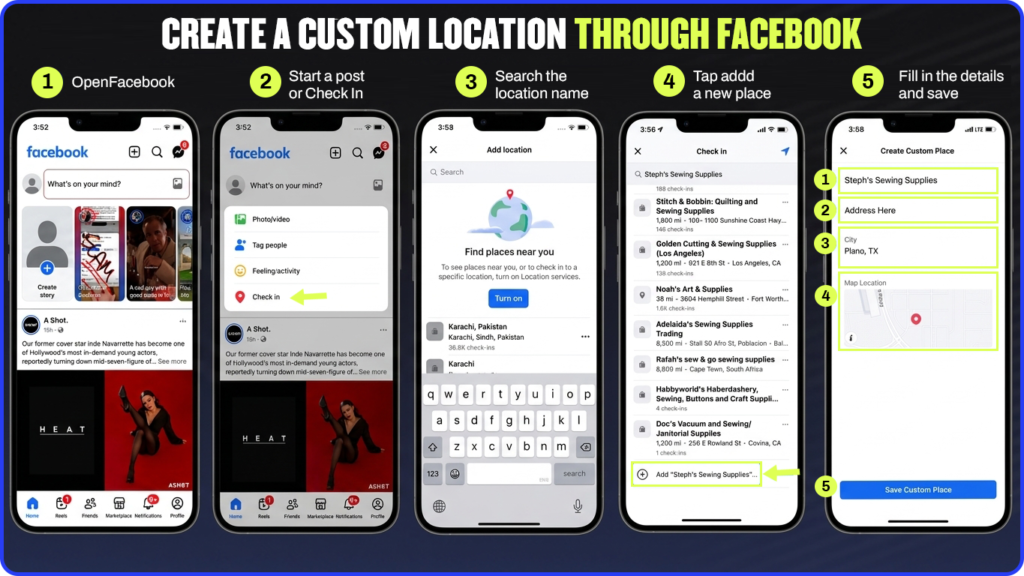
After creation, the location typically becomes available to tag on Instagram within a few minutes to a few days. In some cases it can take up to about two weeks. If it still isn’t showing after two weeks, confirm that the Instagram account is linked to a Facebook Page under Instagram’s business settings, and check that both apps are on their latest versions.
Two realistic use cases for creating a custom location as a home service business:
- Creating an official location for the business’s own office or shop, even without customer foot traffic. It anchors the business to a verifiable physical address and supports the address link in the bio
- Creating a location for a well-known neighborhood, development, or community where the business does significant work, to reinforce geographic presence there over time
Instagram’s own location help page covers the general mechanics. The Facebook-dependency step is the piece most contractors hit unexpectedly.
Troubleshooting: Why a Location Isn’t Showing Up
A few common causes and their fixes:
- The Instagram account is not linked to a Facebook Page. Location data syncs from that connection. Confirm the link under Instagram’s account settings, then try the search again
- The location was just created. The sync can take anywhere from a few minutes to two weeks. Wait and try again before assuming something is broken
- Location Services are disabled on the device. Go to the phone’s Settings, find Privacy or Permissions, then Location Services, then Instagram, and set it to “While Using the App”
- The app is out of date. Check for Instagram and Facebook updates in the App Store or Google Play. Outdated versions sometimes lose location search functionality
- A VPN is active. VPNs can interfere with how Instagram loads place results. Temporarily disable it and try again
- Cache issue on Android. Go to Settings, then Apps, then Instagram, then Storage, then Clear Cache. Try not to use Clear Data unless logging back in is acceptable
Logging out and back into Instagram resolves most issues that none of the above fix.
A Location-Tagging Strategy for Home Service Businesses
The steps above get the tag on the post. This section is what makes the tags actually mean something over time.
1. Tag the Job-Site Neighborhood, Not Just the Home City
A citywide tag gets diluted quickly in a competitive market. Tagging the specific neighborhood or suburb where a job actually happened is more precise and more useful for local discovery.
A homeowner in Maple Grove who searches Instagram for local roofing companies is more likely to find a post tagged to Maple Grove than one tagged generically to Minneapolis. The more specific the tag, the more relevant the audience it can reach.
Targeting a specific neighborhood with marketing is a principle that applies across channels. Location tagging is the Instagram-specific execution of the same idea.
2. Build Coverage Across the Whole Service Area Deliberately
Over months, a business that has tagged job-site content across ten or fifteen different neighborhoods tells Instagram something that a single-location business cannot: real, active, area-wide presence.
This compounds. The business that has tagged fifty posts across eight neighborhoods over a year has a geographic footprint that no single viral post could create. Consistency over time is the mechanism.
3. Pair Location Tags With Proof-of-Work Content
A before-and-after post tagged to the actual neighborhood where the job happened functions like a visual local search result. It is specific, credible, and geographically anchored all at once.
Generic branded content with a location tag is less useful than real job documentation with a location tag. The content type matters as much as the tag.
Building a more relatable brand online covers the content approach in more depth. Location tagging makes that content discoverable to the right local audience.
4. Create a Custom Location for the Business’s Own Office
Even without walk-in customers, having a verified custom location for the office anchors the business to a real, verifiable place. It supports the address link in the bio and gives customers something consistent to tag when they post about the business.
5. Encourage Customers to Tag the Business’s Location Too
A homeowner’s post tagging the business from their own neighborhood is a form of organic, third-party geographic proof. It expands the location signal beyond what self-tagging alone can produce, and it reaches that homeowner’s followers, who are almost certainly neighbors in the same area.
A simple ask at the end of a job, “If you’d like to share a photo, feel free to tag us,” costs nothing and occasionally produces content that no marketing budget could replicate.
For a cross-platform comparison, Nextdoor advertising for contractors covers how neighbor-driven visibility works on a platform specifically built around local recommendations.
None of this requires new content. It is a five-second habit applied consistently to work that is already being posted.
Frequently Asked Questions
Can you add a location on Instagram without a Facebook account?
Existing, already-established places can be tagged directly in Instagram without a Facebook account. But creating a new location that doesn’t yet exist in the database requires going through the Facebook app, since Instagram’s location data is managed through Meta’s shared system.
How long does it take for a new Instagram location to become taggable?
Typically a few minutes to a few days after creating it through Facebook. It can occasionally take up to about two weeks. If it still isn’t showing after that window, check that the Instagram account is properly linked to a Facebook Page and that both apps are up to date.
Should a home service business tag its home office or the actual job site?
Both, used differently. The home office as a stable recurring location in the bio. The specific job-site neighborhood on individual project posts to build geographic coverage across the full service area over time.
Does adding a location actually help with reach and engagement?
Yes, meaningfully. A location-tagged post is visible to anyone browsing that specific location’s page on Instagram, including people who don’t follow the account. That is a real additional discovery surface. Various marketing sources cite specific engagement lift percentages, but Instagram has not confirmed a fixed number, so treat any specific stat you see as directional rather than guaranteed.
Do location tags work differently for Reels than for regular posts?
The tagging mechanic is the same, but Reels benefit significantly more from reinforcing the location verbally and in on-screen text, since Instagram also uses spoken audio and text overlays as discovery signals for video content. The tag alone matters less for Reels than the combination of tag, audio, and text.
A Small Habit With Compounding Returns
Location tagging on its own is not a strategy. It is a five-second habit layered on content that is already being posted.
The home service business that tags every job post to the specific neighborhood where it happened, creates a custom location for its own shop, and occasionally creates locations for the neighborhoods where it does the most work will build a geographic footprint on Instagram that no single campaign spend could replicate. It compounds quietly over months and then becomes very visible.
If you want to connect this into a broader Instagram and social media strategy that is actually producing leads, advertising on Instagram is the natural next step once the organic location presence is working.
And if you want help building the full local marketing system, schedule a call with our team and we will walk through what we would build for your trade and your market.