
Almost every contractor I’ve talked to has a CRM horror story.
You sign up for something that promises to fix your whole operation. Six weeks later your office manager hates it, your techs aren’t logging jobs, and you’re paying $300 a month for a very expensive contact list. Sound familiar?
Here’s what I’ve noticed after working with hundreds of home service contractors: it’s almost always a fit problem. HubSpot is genuinely great software. So is Salesforce. They just weren’t built for dispatchers managing same-day service calls or techs who need job details on their phone before they back out of the driveway. Forrester research confirms it: CRM adoption is high across industries but satisfaction is low, because businesses keep landing on tools that weren’t built for how they actually work.
We’ve been in this space for over a decade. This list is our honest take on what’s working in 2026, who each platform is really built for, and what to know before you sign anything. No sponsored picks.
Why Home Service Companies Need Dedicated CRM Software
The argument is simple. When a homeowner calls in, your CSR needs that customer’s full history before the conversation is over. When a tech leaves the shop, job details need to already be on their phone. When the job closes, the invoice goes out that day, not whenever someone gets around to it.
None of that happens in a spreadsheet. And according to research, businesses that systematically follow up with past customers drive significantly more repeat revenue than those waiting for the phone to ring. The word “systematically” is doing all the work in that sentence. It doesn’t happen if someone has to remember to do it.
The thing most people underestimate is adoption. I’ll say it here: the hardest part of any CRM isn’t the features, it’s getting your team to actually open it consistently three months after you bought it. A platform built around how your operation works gets adopted. A platform built for a different industry, no matter how slick the demo was, doesn’t.
Must-Have Features in a Home Services CRM
Before you watch a single demo, write down the three things bleeding money out of your operation right now. Not what sounds impressive. The actual bottlenecks.
Scheduling and Dispatch That Works in Real Time
Your dispatcher should be dragging and dropping jobs on a live board, seeing who’s available, and the platform should be firing a text to the customer automatically when the tech is on the way. If any of that still involves a whiteboard or a separate spreadsheet, you’re creating miscommunication every single day.

A Mobile App Your Techs Will Actually Open
The app has to work on a job site, not just in a conference room with good wifi. Techs need job history, estimates, invoices, and payment tools in the field. If they have to call the office to get any of that information, you’ve already lost time and introduced room for error.
Follow-Up That Runs Without Anyone Managing It
Review requests, maintenance reminders, appointment confirmations. All of it should trigger automatically after the job closes. If a human has to remember to send any of that, it’s not happening consistently. That’s just reality.
On-Site Invoicing
The invoice should go out before the tech pulls out of the driveway. The faster you invoice, the faster you get paid. Every day that invoice sits creates another day of cash flow delay and another awkward collection conversation you didn’t need to have.
Numbers That Actually Mean Something
Revenue by tech, by job type, by marketing channel. Work order management and revenue tracking in the same system. You stop making decisions based on gut feel and start managing with real information. That’s not a luxury for big operations. That’s just running a business.
The 8 Best CRMs for Home Service Companies in 2026
Each tool below was evaluated on features, pricing, mobile usability, and verified user feedback from G2, Capterra, and Reddit communities for home service trades.
How We Evaluated These CRMs
We work with home service contractors every day. CRM comes up constantly, which platform to start on, which one to switch to, which one they wish they’d never touched. That pattern of conversations informed how we looked at every platform on this list, alongside five concrete criteria:
- Features built specifically for field service work, not adapted from generic CRM templates
- Pricing and real value at each tier, including what gets locked behind higher plans
- Mobile app quality against actual field conditions, not just office demos
- User reviews from G2, Capterra, and Reddit communities including r/HVAC, r/Plumbing, and r/sweatystartup
- Trade fit for HVAC, plumbing, electrical, landscaping, and roofing specifically
Every platform on this list had to earn its place across all five.
1. ServiceTitan
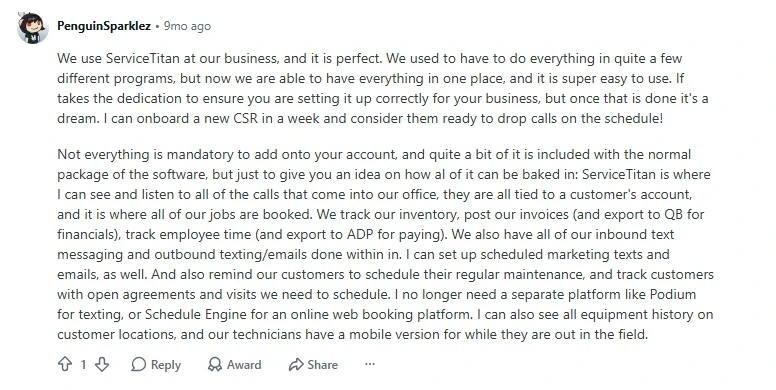
ServiceTitan is the most fully built field service management platform on the market. It handles scheduling, dispatch, ServiceTitan is the one every big HVAC and plumbing company eventually ends up talking about. It handles scheduling, dispatch, flat-rate pricing, payroll, inventory, and multi-location reporting inside one system. When it’s running well, it really does function like an operating system for the entire business, not just a CRM.
Here’s the part the sales rep won’t lead with: the onboarding is a serious project. Not a weekend setup. Multiple contractors I’ve talked to have gone three or four months before they’re fully operational on ServiceTitan. And if you don’t have someone inside your business whose job it is to own the platform, you’re going to feel that drag every single week.

The support response time for smaller accounts is also a real complaint across G2 and Capterra. Not universal, but consistent enough that you should ask about it specifically before you sign. There’s also a pattern of smaller companies getting sold into long contracts before they were ready for the platform. That’s a real risk if a rep is telling you that you need ServiceTitan right now when you’re running 3 trucks.
- Website: https://www.servicetitan.com/
- Best For: Multi-location operations doing $1M or more annually with 5 or more trucks. If you’re planning to stay under $3M, start somewhere that fits where you are today.
- Pricing: Custom quote only. Based on verified user reports, expect $245 to $500 per technician per month plus $2,000 to $10,000 or more in mandatory implementation fees. No free trial.
- Pros: Most complete feature set in the category / Marketing attribution is genuinely best-in-class / Built for the complexity of multi-location scale
- Cons: Onboarding can take months / Support varies significantly by account tier / You need someone internal dedicated to owning the platform or you won’t get full value
💡 One thing to keep in mind: I’ve talked about this a lot on our podcast. When contractors come to us asking about ServiceTitan, we tell them there are really two paths. You know you’ll probably end up there eventually, so do you go through the growing pains now or wait until the revenue justifies it? Because like I said on the podcast, “the idea of having to switch CRMs every year is super frustrating on the business owner, and it just doesn’t make sense for your team to have to put them through that.” If you’re heading to $5M or more, ServiceTitan is probably where you land. Just don’t let a sales call convince you that you need it at $1.5M.
2. Jobber
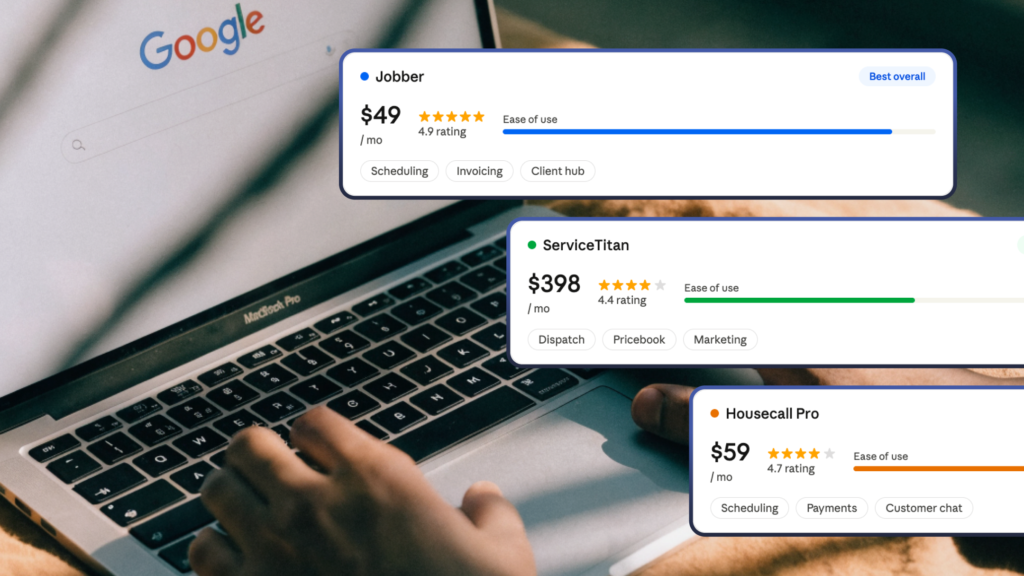
Jobber is the platform that does exactly what it says without making you feel like you need a project manager to implement it. Scheduling, quoting, invoicing, two-way texting with clients, automated appointment reminders, and a clean hub where customers can approve quotes and pay online. You can realistically get your team up and running in a day or two.
Where it starts to show its limits is when you need real trade depth. There’s no native flat-rate pricing book, which for HVAC and plumbing companies presenting Good-Better-Best options to a homeowner at the kitchen table is a meaningful gap.
The reporting is also fairly surface-level for businesses that want to analyze revenue by service type or track technician performance in detail. Jobber isn’t trying to be ServiceTitan and that’s actually fine. It’s the right tool for a lot of businesses. Just not every business forever.
- Website: https://www.getjobber.com/
- Best For: Small to mid-sized crews of 1 to 15 people who want something operational this week without a 3-month onboarding process
- Pricing: Individual plans from $39/mo (Core) to $149/mo (Grow) billed annually. Team plans $169 to $599/mo. 14-day free trial, no credit card required.
- Pros: Actually fast to get running / Clean client-facing experience / Strong mobile app / Recognized for easiest HVAC onboarding in 2026
- Cons: No native flat-rate pricing book / Advanced reporting locked behind higher tiers / Each additional user beyond the plan cap costs $29/mo, which adds up
For trade-specific comparisons in roofing, see our breakdown of the best roofing CRMs.
3. Housecall Pro
If there’s one thing Housecall Pro does better than everything else on this list, it’s getting reviews for you automatically. The platform sends review requests the moment a job is marked complete. Not an hour later. The moment. It fires the tech-on-the-way text automatically, runs post-job follow-up sequences, and does all of it without anyone in your office managing it. For a contractor who knows that growing their review count is directly tied to how many calls they get next month, that automation alone makes Housecall Pro worth a serious look.
The data backs this up too. Housecall Pro’s own customer research shows a direct connection between timely post-job follow-up and higher rebooking rates, and their broader platform reporting shows that contractors using automation consistently outperform those who aren’t.
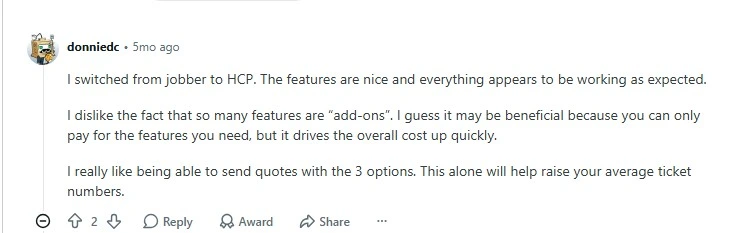
Now the stuff they don’t put on the homepage. The $59 entry price is real but it’s not the price you’ll actually pay. QuickBooks sync, the estimate builder, anything beyond the basics sits behind the Essentials plan. Add a few extra users on the MAX plan and you’re at $400 a month before you’ve added anything that looks like a surprise.
- Website: https://www.housecallpro.com/
- Best For: Growing businesses with 2 to 10 technicians where automated follow-up and review generation are priorities right now
- Pricing: Basic $59/mo (1 user, annually). Essentials $149/mo (up to 5 users). MAX $299/mo. Additional MAX users $35/mo each. QuickBooks only available on Essentials and above.
- Pros: Best automated follow-up and review generation on this list / Polished mobile app / Yelp integration added in 2026 for unified lead management
- Cons: Real monthly cost runs 30 to 50 percent above the advertised entry price once add-ons stack up / Support quality drops at lower tiers / Cancellation complaints are a documented pattern
4. Service Fusion
Service Fusion isn’t trying to win any beauty contests. What it does is charge you one flat rate no matter how many people are on your team. No per-user fees. No billing surprises when you hire two more techs in the spring. For businesses where headcount fluctuates seasonally or you’re actively scaling, that pricing model is genuinely useful and underrated.
The dispatch board works. The QuickBooks integration is reliable, which sounds like a low bar until you’ve used platforms where it isn’t. The core workflow from creating a job to closing an invoice is clean and doesn’t require a lot of training to get right. What it doesn’t have is depth. No built-in flat-rate pricing book. No real marketing automation.
The mobile app also gets notably weaker reviews than Jobber or Housecall Pro, especially in low-signal areas where a lot of field work actually happens.
- Website: https://www.servicefusion.com/
- Best For: Teams wanting unlimited users at a predictable flat cost, especially seasonal operations where per-seat pricing creates billing headaches
- Pricing: Starter $208/mo (annually) or $245 month-to-month. Plus $325/mo annually. Pro $533/mo annually. No free trial; demo available.
- Pros: No per-user fees on any plan / Reliable QuickBooks sync / Straightforward dispatch-to-invoice workflow
- Cons: Mobile app underperforms in low-connectivity environments / No flat-rate pricing book / Data portability concerns in recent reviews
5. Kickserv
Kickserv knows exactly what it is and doesn’t pretend otherwise. It’s the most affordable full-featured option on this list. Scheduling, invoicing, QuickBooks sync, basic customer management, estimates. You can get a small crew operational in a single afternoon. The 30-day free trial with no credit card is the most generous offer on this list and actually gives you enough time to see if it fits before you spend anything.
The limits are clear and consistent across reviews: reporting is thin, inventory management is weak, and it wasn’t built for coordinating multiple crews at any real scale. If you’re a solo operator or a 2 to 3 person crew still running jobs off a spiral notebook, none of that is your problem yet. If you’re running 8 trucks, this isn’t your platform. But that’s fine. It’s not trying to be.
- Website: https://www.kickserv.com/
- Best For: Solo operators and small teams of 1 to 5 people who need to get organized without buying complexity they’re not ready for
- Pricing: Lite $60/mo for 2 users. Run $119/mo. Scale $199/mo. 30-day free trial, no credit card required.
- Pros: Most accessible entry point on this list / Fast to set up / Genuinely useful free trial / Support team consistently gets strong marks for being reachable and actually knowing the product
- Cons: Thin reporting / Limited automation / Not designed for multi-crew dispatch at scale

6. FieldEdge
FieldEdge has been in the HVAC and plumbing software space for over 40 years. That’s not a marketing stat, it’s the reason the platform understands trade-specific workflows at a depth that newer tools are still trying to build toward. The Coolfront flat-rate pricing integration is the clearest example of this. Thousands of pre-built HVAC and plumbing repair line items, Good-Better-Best presentation built in for the tech to walk a homeowner through options at the kitchen table. Not an add-on. Not a workaround. Actually built in because that’s how HVAC techs sell.
Service agreement tracking with automated renewal scheduling is the other standout. If maintenance contracts are a meaningful revenue stream for your business, having renewals tracked and triggered without someone managing a spreadsheet in parallel is genuinely valuable.
The honest limitations: the mobile app feels dated next to Jobber or Housecall Pro, pricing requires a demo call before you see a single number, and the platform doesn’t do a great job of notifying users when changes roll out. If you care about modern UI or pricing transparency upfront, factor that in.
But for an established HVAC or plumbing operation where service agreements and flat-rate pricing are core, FieldEdge has a depth of fit that a lot of newer platforms haven’t caught up to yet.
- Website: https://fieldedge.com/
- Best For: HVAC and plumbing contractors with 5 to 50 technicians where flat-rate pricing and service agreement management aren’t nice-to-haves, they’re the actual business model
- Pricing: Custom quote only. Third-party research places typical costs at $100 to $200 per user per month. No free trial.
- Pros: Coolfront flat-rate pricebook is genuinely best in class for HVAC and plumbing / Automated service agreement renewal tracking / Strong QuickBooks Desktop and Online sync
- Cons: Mobile interface feels dated / Limited marketing tools / You need to book a demo just to see pricing / Trade coverage limited to HVAC and plumbing
7. Successware
Successware is the platform for the business owner who’s tired of having QuickBooks in one tab, their field service tool in another, and payroll in a third, and wants all of it in one place. That’s what Successware actually delivers: payroll, job costing, revenue reporting, and dispatch inside one system, with no integration dependency between platforms that were never quite designed to talk to each other properly.
The reporting goes deeper than anything else on this list. Multi-location operators point to it specifically when they need business intelligence that standard field service platforms can’t produce.
The downside is real: the learning curve is steep, the interface is dated, and if you ever decide to leave, getting your historical data out has been described as painful by former users. Successware rewards full commitment. It’s not a platform you half-adopt.
- Website: https://www.successware.com/
- Best For: Established businesses doing $2M or more annually that need everything, including accounting, inside one system and are done managing platform integrations
- Pricing: Custom quote only. Per-user pricing varies by module selection and company size.
- Pros: Deepest reporting on this list / Built-in accounting eliminates the need for a separate bookkeeping tool / Designed for real multi-location operational complexity
- Cons: Steep learning curve / Interface is dated / Getting your data out if you leave is harder than it should be
8. ProLine
I want to be upfront here because I’ve written about ProLine before, and I use it myself at Owl Roofing. I genuinely think it’s the most underrated option on this list, specifically for residential roofers who keep bouncing between platforms and hating all of them.
Here’s the pattern I keep seeing. A roofer signs up for a generic CRM or one of the HVAC-first platforms that got adapted for roofing. The pipeline stages don’t match how they actually sell. The quoting logic doesn’t fit how they estimate. The follow-up sequences weren’t built for the gap between a first estimate and a signed contract, which is where most roofing revenue quietly disappears. So six weeks later, nobody’s using it and they’re back to looking for something else.

ProLine was built from scratch for how residential roofing companies actually work. Not adapted. Built for it. The pipeline matches a roofing sales cycle. The quoting tools fit how roofers estimate. The follow-up sequences are specifically designed for the leads that went cold after a first visit. And the free plan is real, not a 14-day trial with a countdown timer. You can run your actual sales process on it before you decide whether the paid tier is worth it.
We went deep on how ProLine compares to other roofing CRMs. Worth reading if you’re a roofer who’s been burned by the wrong CRM before.
- Website: https://useproline.com/
- Best For: Residential roofing contractors who are tired of adapting tools that weren’t built for their workflow and want something that actually fits how they sell
- Pricing: Free plan with no expiration and no credit card required. Paid plans start at $497/mo (Good), $797/mo (Better), $1,697/mo (Best).
- Pros: Built specifically for residential roofing, not adapted from another trade / Quick adoption because the workflow actually makes sense to roofers / Genuine free plan with no time limit / Quoting, follow-up automation, invoicing, and reporting all included
- Cons: Smaller third-party integration library compared to general-purpose CRMs / The jump from free to first paid tier is significant
💡 Something to note: The roofers I see get the most out of ProLine are the ones who stopped looking for a perfect CRM and started looking for one their team would actually adopt. That’s the whole conversation we had on our blog about ProLine vs. the alternatives. Features matter a lot less than whether your reps are logging into it six months from now. If you’re a residential roofer and you haven’t looked at ProLine yet, at minimum test the free plan before you commit to anything else.
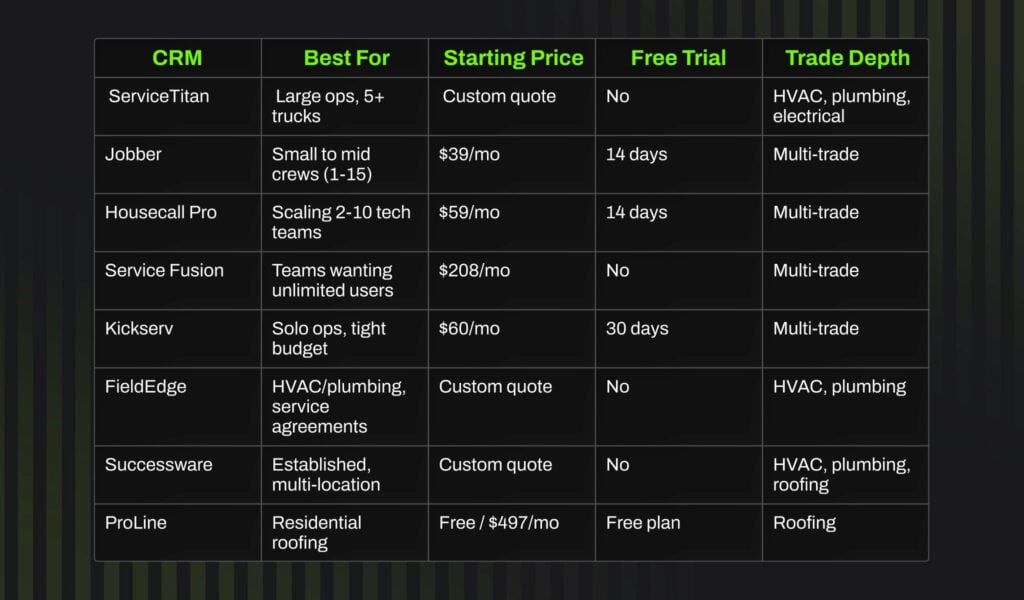
Here is a side-by-side look at all 8 tools.
How to Choose the Best CRM for Contractors in 2026
The advice I give face to face: don’t pick what the biggest company on your street uses. Don’t buy more platform than you can actually get your team to adopt right now. Start with the problem that’s costing you the most and work backward.
Start With Your Biggest Operational Pain
Before a single demo, write down the three things bleeding money right now. Missed follow-ups? Dispatch chaos? Techs who can’t invoice on-site? The CRM that directly solves that specific problem is almost always the right one, even if it’s not the most well-known name in the category.
Match the Tool to Your Trade
This matters more than most people think going in. A CRM for HVAC needs flat-rate pricing and service agreement management baked in. A CRM for roofing needs pipeline stages and quoting logic that maps to how roofers actually close. For residential roofers in particular, ProLine belongs in this conversation because it’s the only platform on this list built around a roofing sales cycle rather than adapted to one. Generic platforms work across trades but consistently miss the depth where it actually counts.
Be Honest About What You’ll Actually Pay
The entry price on the pricing page is almost never what you’ll pay once your team is using the platform properly. Add-ons for QuickBooks sync, GPS tracking, SMS messaging, and review automation can push your real monthly cost 30 to 50 percent above the advertised rate. Budget for the tier that includes what you actually need, not the cheapest plan that lets you say you’re on the platform.
Prioritize Adoption Over Features
This is the one I come back to more than anything else. The most feature-rich CRM in the world is worthless if your team stops logging into it after three weeks. If you’ve been burned by software nobody uses, start simpler than you think you need. Grow into more complexity once the team has actually built the habit. Complexity kills adoption, every time.
Don’t Switch Platforms Every Year
Every CRM has problems. Every single one on this list. If you’re switching tools annually trying to find a perfect system, you’re creating more operational disruption than the software was causing. Pick something appropriate for your current size, commit to training your team on it properly, and only move when you’ve genuinely outgrown it.
What Are the Main Benefits of Using a CRM for Home Services?
In practical terms, here’s what shifts:
- Fewer lost leads: Automated follow-up means no lead goes cold just because your office had a hectic three days.
- More reviews without chasing them: Review requests sent within minutes of job completion get far better response rates than ones sent two days later. Growing your review count is one of the highest-ROI activities for any home service business, and the right CRM makes it completely automatic.
- Faster cash flow: On-site invoicing and payment links cut your receivables cycle meaningfully. Less chasing, more collecting.
- Real revenue visibility: Revenue by tech, by job type, by lead source. You stop making decisions based on what feels right and start making them based on what’s actually happening in your business.
- A customer experience that gets you referred: Automated confirmations, tech-on-the-way texts, and post-job follow-ups are what separate businesses that get word-of-mouth referrals from businesses that have to keep buying leads.
What Are the Best Mobile CRM Tools for Home Services?
If your techs are in the field, the mobile app is where the whole CRM either works or doesn’t. It doesn’t matter how clean the dashboard looks on a desktop if the app falls apart on an Android phone from two years ago.
The three with the strongest field-facing experience on this list are Jobber, Housecall Pro, and ServiceTitan. Jobber has the cleanest, most intuitive mobile interface for small to mid-sized crews. Housecall Pro leads on automated field-to-customer communication. ServiceTitan’s mobile app has the deepest functionality for large operations that need full access to everything away from a desk.
Whatever platform you’re seriously considering, test the actual mobile app on the devices your techs carry before you commit. A platform that demos great on a MacBook and falls apart on a three-year-old Android is not a platform your field team will use.
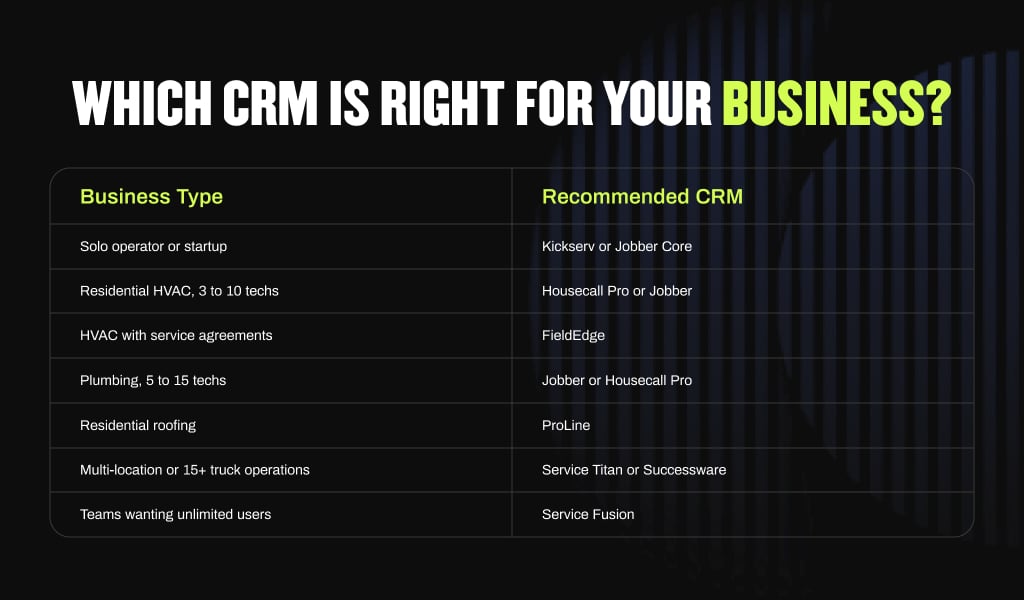
Which CRM Is Right for Your Business?
The best CRM for home service companies is the one your team is still using six months after you bought it. Not the one with the longest feature list. Not the one the biggest competitor uses. Test every free trial that’s available. Check the mobile app in real conditions. And match the platform to the problem you’re actually trying to solve.
Ready to Turn Your CRM Data Into Real Leads?
A CRM keeps your jobs organized. Hook Agency builds the marketing engine that fills your schedule with the right jobs in the first place.
We work exclusively with home service contractors across HVAC, plumbing, electrical, and roofing. SEO, paid ads, and home services web design built to convert. Full transparency on what we’re doing every month. You own every account.
If you want to see what a real home services marketing strategy looks like for your trade and market, schedule an intro call. No hard sell. Just an honest conversation about whether we’re the right fit.
Frequently Asked Questions
What is the best CRM for home service companies?
For most home service businesses, Jobber or Housecall Pro offer the best balance of features and ease of use. Large operations with 5 or more trucks doing $1M or more annually should evaluate ServiceTitan despite its higher cost and longer setup time.
Do HVAC and plumbing companies need a specialized CRM?
Yes. Generic CRMs like HubSpot or Salesforce do not include dispatch maps, flat-rate pricing books, or service agreement tracking. The difference becomes obvious the first time you try to build a maintenance agreement renewal workflow inside a general-purpose tool.
What is the cheapest CRM for home service businesses?
Kickserv starts at $60 per month for 2 users with a 30-day free trial and no credit card required. ProLine offers a permanently free plan for roofing contractors with no expiration and no core feature lockout.
Can a CRM replace scheduling software for home services?
Yes. Most trade-specific CRMs including Jobber and Housecall Pro include built-in home services scheduling software with dispatch, so a separate scheduling tool is typically not needed.
What CRM works best for solo home service operators?
Kickserv and Jobber Core are both strong options. Both are simple to set up, affordable, and include mobile apps. Kickserv’s 30-day free trial gives you enough time to fully test the platform before committing.
When You Do Not Need a CRM Yet
If you’re under $200K in revenue and most of your jobs still come through referrals and word of mouth, a CRM is probably not your highest-leverage move right now.
The businesses that see the fastest return from these platforms already have consistent lead flow and need a better system to capture, convert, and retain those leads. If the pipeline is still inconsistent, build that foundation first. Get your Google Business Profile right, get your review strategy in place, put a real home services marketing strategy behind the business. Then you’ll have something worth organizing.