The short answer
Wix and Squarespace are easy to use, which is why they are great for DIY owners. Professional web designers are usually better off on WordPress because it gives full code access, custom design from scratch and a site the client actually owns.
- Wix: easiest drag and drop, site stays on Wix
- Squarespace: polished templates, limited structure changes
- WordPress: full control, portable, built for custom work
Originally published January 23, 2017. Updated November 5, 2026.
Wix and Squarespace are built for people who want to build their websites themselves. They are wonderful tools for rolling out short-term projects (I help my wife build a Squarespace site for our wedding), and it’s super easy to get up and running yourself quickly.
WordPress requires a bit more work – you have to download WordPress from WordPress.org, connect it to a database, and sort through 10’s of thousands of themes, some are hideous and some are glorious. If you don’t understand web development, you actually have to get into the code at least at some point to get to the final product in WordPress.
Squarespace is a black box, and Wix is not much different – so if you understand web development, you could really get bogged down in Squarespace and Wix. They have places for custom CSS (the code that changes style attributes for those who don’t know) but things that edit the structure of the site are cordoned off and it’s generally discouraged to get in there.
Squarespace (and Wix as well has matured) are both beautiful black box solutions for non professionals
But if you are a professional, or are looking for a professional career in web design – most will find the limitations of the platform a little murky at times for long time pursuit.
Where-as WordPress is built for tinkering, has 1,000’s of plugins, themes, and is built for custom coded themes and development modifications
So to me if you’re pursuing web design as a profession or even as a serious hobby – WordPress takes the cake.
You don’t want to be locked into every time you create a site you have to pay 15 bucks a month, especially if you want to create 5 sites just for fun. In my opinion, if you’re making websites for a business owner you want to get them out of monthly fees and into ‘I own my website’ and all I need to pay is hosting. Yes, hosting can be $4, $5, or $8 bucks a month with an annual commitment on Godaddy, but you can also throw 20 sites on that hosting on the higher end packages, making this quickly more cost-effective.
Is Wix easy to use?
Yes. That is the whole point of it. Wix and Squarespace both let someone with no coding background drag blocks onto a page, swap in their logo and publish the same day. For a wedding site, a portfolio or a one-person side business, that is a great trade.
The catch is what you give up for that ease. You work inside the editor’s rules. You can change colors and fonts and move sections around, but the structure underneath belongs to the platform. When a client asks for something the editor was not built for, you end up stacking workarounds instead of writing a clean solution.
So the honest answer for web designers is this: easy to start, harder to grow. The easier the tool is for the owner, the less room it leaves for the professional.
Wix vs Squarespace vs WordPress at a glance
How the three platforms compare for someone who builds sites for clients
Swipe sideways to see every column →
| Wix | Squarespace | WordPress | |
|---|---|---|---|
| Built for | DIY owners who want drag and drop | DIY owners who want polished templates | Developers, agencies and serious hobbyists |
| Code access | Limited, mostly custom CSS and Velo | Custom CSS and code blocks | Full access to theme and plugin code |
| Custom design from scratch | Possible, fights the editor | Possible, fights the templates | Native: build a theme to the mockup |
| Plugins and integrations | App market, curated | Built-in features, small extension list | Tens of thousands of plugins |
| Who owns the site | Stays on Wix | Stays on Squarespace | Client owns files and database |
| Moving to another host | Not possible as-is | Content export only | Move anywhere |
| Ongoing cost | Monthly plan per site | Monthly plan per site | Hosting plus any paid plugins |
- Leads from Google, Maps and AI search
- Nobody else is buying the same lead
- You own your website and ad accounts
“Hook Agency has been an incredible partner for our digital marketing growth.”
Kristin Sullivan, Bob’s ACFocused on the map? See Google Maps SEO
Differentiating yourself from the non-professional
As a professional web designer, you don’t want people to be wondering ‘why didn’t I just do that myself?’
To me – taking a completely original visual design that was created in illustrator and totally dedicated to a company’s business goals is totally different than modifying an existing template. Thinking in terms of business goals sets professional web designers apart and starts to be an obvious value add for clients.
Taking a completely custom visual design and making it into a Wix or Squarespace site is not what those tools were intended for – they want you to modify their existing 40 or so templates and then THEY are the experts, not you, as a web designer. And that’s a dangerous place to be in – just the technician implementing what some other expert formulated (for a hypothetical business that’s not the one you’re working with!)
So to me, the ideal is to create a WordPress theme from scratch – a great way to start that approach is something called Template Toaster! Check it out and let me know what you think.
How to choose the right platform
Most of the arguments online come down to one question: who is going to run this site after launch? If the owner will build and maintain it alone, a builder is the right call. If a pro is building it to generate business, the decision gets more serious.
Which platform should you use?
A quick decision path for the person building the site
What a professional build looks like
The difference between a pro and a template editor is not the software. It is the thinking that happens before anyone opens the software. A pro starts with the business, the customers and the jobs the site has to sell, then designs around that.
A professional web design process
What separates a pro build from a modified template
- 1DiscoveryLearn the business goals, services, service area and best customers.Done whenYou can name the top 3 jobs the site must sell
- 2SitemapPlan pages around services and locations, not around a template.Done whenEvery service and city has a home
- 3WireframeLay out each key page for calls and form fills first.Done whenThe call button is visible without scrolling
- 4Visual designOriginal design in Figma or Illustrator, built for this brand.Done whenThe owner says it looks like them
- 5BuildCode the theme, wire up forms, tracking and schema.Done whenEvery lead source is tracked
- 6Launch and improveTest speed, mobile and forms, then iterate on real data.Done whenFirst month of leads reviewed
You can run this process on any platform. WordPress just gets out of the way when you reach step 5, because nothing in the build is locked.
Why this matters even more for contractors
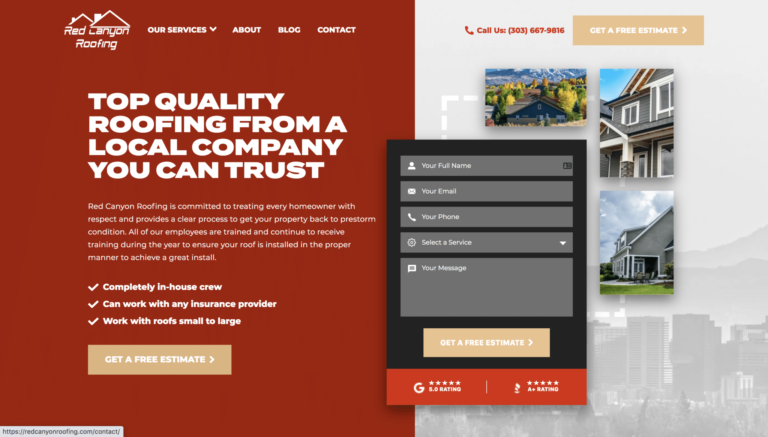
A roofer, plumber or HVAC company does not need a pretty site. They need a site that makes the phone ring. That means service pages, city pages, tracking on every call and form, and room to add content every month for search. Builders can handle some of that. They get awkward fast when you need dozens of location pages, custom schema or a form that drops leads straight into a CRM.
Ownership matters too. When a contractor sells the business or switches agencies, the website should go with them. A site on WordPress, with the domain in the owner’s name, is an asset. A site rented from a builder is a subscription.
Pro website checklist for home service businesses
What a contractor site needs no matter what platform it runs on
- Click-to-call phone number in the header
- A page for each core service
- Service area or city pages
- Short quote form on every page
- Real project photos, not stock
- Reviews and trust badges near the form
- Fast load on a phone
- Call and form tracking
- Client owns the domain and the site
- Google Business Profile linked and consistent
Frequently Asked Questions
Is Wix easy to use?
Yes. Wix is one of the easiest website builders for beginners. You drag blocks onto a page, edit text in place and publish without touching code. The trade-off is less control over structure and no way to move the site to another host.
Is Squarespace better than Wix?
For design-focused sites, many people prefer Squarespace templates. Wix gives more layout freedom in the editor. Neither is a great fit when a professional needs to build a fully custom design or hand the client a portable site.
Can a web designer use Wix or Squarespace professionally?
Yes, and some do, especially for small brochure sites. The risk is that the client wonders why they did not just do it themselves, and you are limited to what the platform allows.
Why do agencies prefer WordPress?
WordPress lets you build a custom theme to match an original design, add any feature with plugins or code, and move the site to any host. The client owns the files, the database and the domain.
What platform is best for a contractor website?
The best platform is the one that supports service pages, city pages, call and form tracking and steady content for SEO, and that the owner fully controls. For most growing home service businesses, that points to WordPress.